
There are many ways to style text. You change the color, size, font, border, background, aligning, and much more. However, for each rule you add into your css, you must add it in the format "property: value;", and not just the value.
The property for changing the color of text is simply "color." There are many different values of the color property, like the normal rainbow colors and even colors you've never heard of. In fact, for the value, you can type rgb(#,#,#) to generate a color of your own. Here's an example:
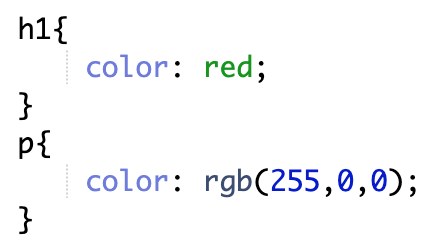
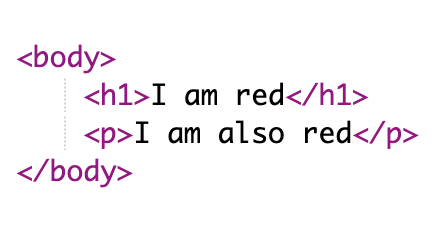
This code yields the following result:

There are many other properties for styling text. For example, you can style them using image properties. Here are some other ways:
| Property | Description | Types of values |
|---|---|---|
| Background-color | Controls color of background | Same as color values |
| Font-family | Controls the font | Arial, Verdana, Monospace, Sans-serif, etc. |
| Text-align | Controls the text's horizontal alignment | Left, Right, Center |
| Font-size | Controls size of text | A value would be a number plus px |
For even more ways to style text, go to w3schools.com.